Facebook (Meta) Pixel Integration Is Live: Track Your Ads, Improve Your Ads

If you run Meta ads to bring people to your Coachli profile, you already know the question that never stops: Are these ads actually working?
You can see how much you spent. You can see how many clicks came through. But then the person lands on your profile, and the trail goes cold. Did they book a session? Did they purchase your course? Did they even get far enough to start checkout? You have no idea. And that gap between your ad spend and what actually happened is the most expensive blind spot in your marketing.
Facebook (Meta) Pixel integration on Coachli closes that gap.
Once you connect your Meta Pixel to Coachli, we automatically fire conversion events to Meta every time someone on your profile takes an action. Profile view. Checkout initiated. Purchase completed. All of that data flows directly into Meta Ads Manager so you can see the complete picture of your ad performance and optimise campaigns with real data instead of guesses.
You don't set anything up manually. You don't add code. You don't hope it works. You connect your Pixel ID and Coachli handles the rest.
Why This Matters for Your Ad Spend
Most coaches and creators who run Meta ads are flying partially blind. You know the top of your funnel (clicks, impressions, cost per click), but you have no visibility into the bottom (did they actually buy?). That means you are optimising based on incomplete information.
With Meta Pixel connected to Coachli, you get the full funnel. You can see exactly how many people who clicked on your ad actually landed on your profile. How many started checkout. How many completed a purchase. That data tells you whether your ad creative is attracting the right people, whether your profile is convincing those people to take action, and whether your money is actually generating revenue or just generating clicks.
That is not a nice-to-have. That is how you know if your ads are working.
How It Works (Without the Complexity)
The setup takes about two minutes.
Go to your Integrations page, find Facebook (Meta) Pixel, and click to connect. You will see two fields. The first is your Meta Pixel ID, which you can find in your Meta Ads Manager. The second is a Conversions API access token, which is optional but gives you more reliable tracking (we will explain why in a moment).
Enter your Pixel ID. That is required. The access token is optional but recommended. Click Connect and you're done.
From that moment on, Coachli automatically tracks three key events and sends them to Meta:
Profile View: Someone lands on your Coachli profile. That event fires to Meta.
Initiate Checkout: Someone starts the checkout process for any of your offerings. Meta knows it happened.
Purchase: Someone completes a booking or payment. Meta records the conversion.
Every visitor is tracked. It does not matter how they found you, what device they are on, or whether they have ad blockers. The data reaches Meta and appears in your Ads Manager.
Getting Started In Three Steps
Step 1: Find Your Pixel ID
Log into Meta Ads Manager. Go to Events Manager. You will see your Pixel ID there. Copy it.
(We have a "Learn how" link right on the integration page that takes you directly to Meta's instructions, so you don't have to remember this.)
Step 2: (Optional) Get Your Conversions API Access Token
This is optional but recommended. You can add it now or skip it and add it later. If you want it, Meta Events Manager shows you where to generate it.
(Again, Coachli provides a helper link for this too.)
Step 3: Connect on Coachli
Go to Integrations > Facebook (Meta) Pixel. Paste your Pixel ID. Optionally paste your access token. Click Connect. Done.
From that moment forward, every action on your profile gets tracked and reported in Meta Ads Manager.
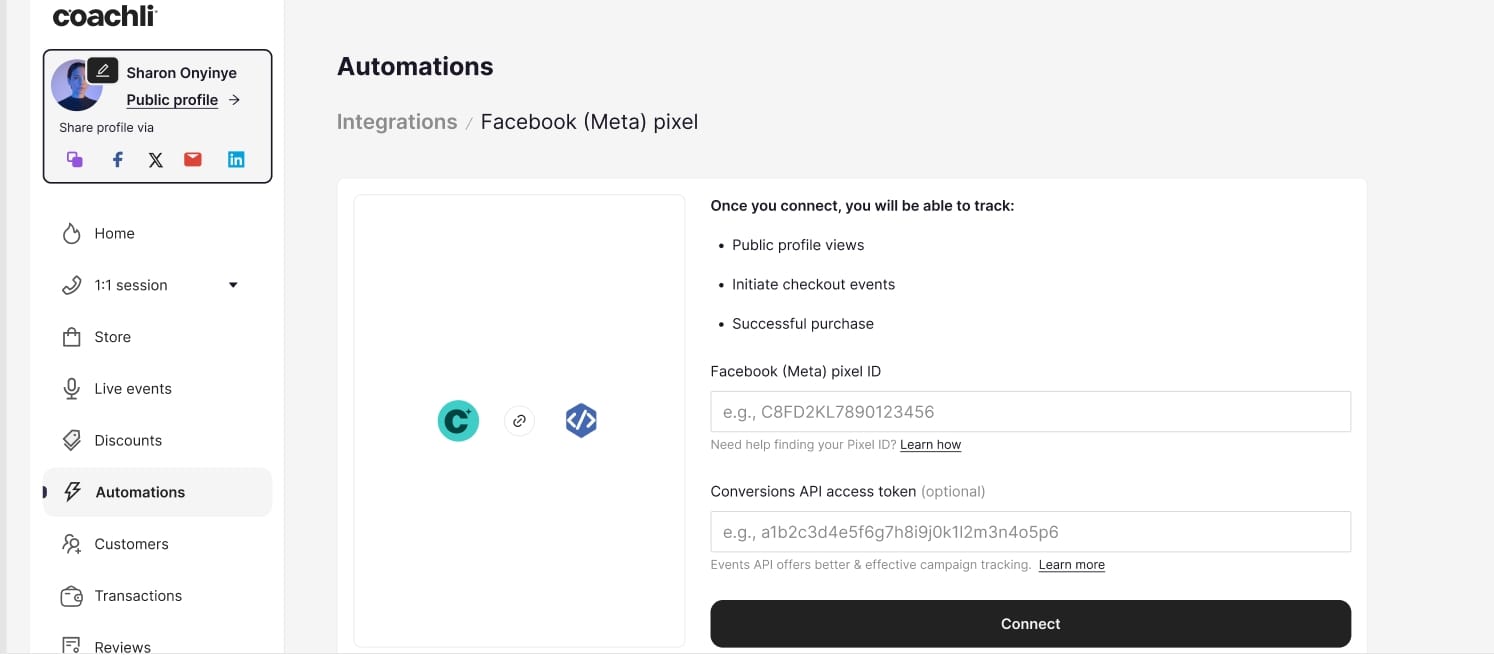
The Image above shows the Facebook (Meta) Pixel integration page in Coachli, displaying the Pixel ID input field, the optional Conversions API access token field, helper links for each, and the Connect button.
Browser Pixel + Server-Side Tracking = Accuracy You Can Trust
Here is where the Conversions API access token comes in.
By default, Meta Pixel uses browser-side tracking. That works fine most of the time, but ad blockers and browser privacy settings can sometimes prevent the data from reaching Meta.
When you add a Conversions API access token, Coachli uses two tracking methods simultaneously. Browser-side (the standard Meta Pixel) and server-side (Conversions API). Both are sending the same event data to Meta through different paths. If one path gets blocked, the other gets through. The result is more complete and accurate conversion data.
Meta recommends using both together, and that is why we made the access token optional but recommended. If you want the most reliable tracking, add it. If you just want to start and add it later, you can connect with the Pixel ID alone.
One Important Thing: Your Data Stays With Meta
Coachli does not store, display, or process any conversion data. We don't see it. You don't see it on Coachli. All the metrics, all the reporting, all the conversion data lives entirely in Meta Ads Manager, where you have always been looking at your ad performance.
What Coachli does is fire events to Meta when they happen. The data flows one direction: from Coachli to Meta. Nothing comes back to Coachli, and nothing is stored here.
This means your privacy is protected, your data is secure, and all your ad insights remain where they belong: in your Meta account.
What This Does for Your Business
Once your Pixel is connected, you can start asking the questions that actually matter:
- Which of my Meta ad campaigns are bringing the people most likely to book or buy?
- What is my actual cost per acquisition, not just cost per click?
- Which ad creatives are attracting the right audience versus just getting clicks from curious people who never convert?
- Should I spend more on the campaigns that are driving purchases, or scale down the ones that drive traffic but not sales?
These are the questions that separate coaches who scale sustainably from those who keep throwing money at ads hoping something sticks.
No Setup, No Code, No Friction
This is what separates a good integration from a useful one. There is no technical setup. No code to paste. No waiting for your developer. You enter two pieces of information, and it works immediately.
If you disconnect, event firing stops right away. If you want to reconnect later, you can. Everything is under your control, and nothing is complicated.
Here's Why We Built This Feature
Coachli has always been built around one idea: remove the friction between your expertise and getting paid for it. That applies to booking systems, payment processing, email automations, subscriptions, and now ad tracking.
You should not have to choose between having a simple platform to manage your business and having the tools to track what is actually working. You should not have to integrate three different services just to see your ad performance. You should not have to be a marketer to know if your marketing spend is worth it.
Meta Pixel integration on Coachli brings that standard closer to reality.
Frequently Asked Questions
Do I need a Conversions API access token to use Meta Pixel on Coachli?
No. Your Pixel ID is what is required. The Conversions API access token is optional but recommended because it provides more reliable tracking, especially for visitors using ad blockers or privacy-focused browsers. You can connect with just the Pixel ID and add the token later if you want to.
Will I see my conversion data on Coachli?
No. All conversion data goes directly to Meta Ads Manager. Coachli only fires the events—we do not store or display any of the metrics. This keeps your data secure and means all your ad reporting stays in the place you are already using.
What happens if I disconnect my Meta Pixel?
Event firing stops immediately. Your Pixel ID and access token are removed from Coachli. If you want to reconnect later, you can do so at any time.
Which events does Coachli track?
Three key events: Profile View (when someone lands on your profile), Initiate Checkout (when someone starts the checkout process), and Purchase (when someone completes a booking or payment). All events are tracked regardless of how the visitor arrived or what device they are using.
Does Coachli include customer personal information in the event data?
No. Only standard Meta event parameters are sent. Customer personal information is never included in the conversion event payload.
Can I track events from visitors who came from sources other than my Meta ads?
Yes. All visitors are tracked regardless of their traffic source. If someone landed on your profile organically or through another ad platform, those actions still fire to Meta if your Pixel is connected.
How long does it take to set up?
About two minutes. Find your Pixel ID in Meta Ads Manager, paste it into Coachli, click Connect, and you are done.
Getting Started Today
Meta Pixel integration is live now. If you have been wondering whether your ad spend is working, you will finally have an answer.
Go to Integrations, find Facebook (Meta) Pixel, and connect. All you need is your Pixel ID.
Your next client is probably coming through a Meta ad. Make sure you know when they arrive, and whether they convert. If you're yet to sign up on Coachli, this is the sign you've been waiting for. Join 23,000+ creators, coaches, consultants and freelancers on Coachli today